Optimizing Local LLMs on Apple Silicon / EP01
Why Are Local LLMs Slow? — Prefill and Decode
Why can an LLM take ages to start, then stream quickly? Prefill, decode, TTFT, KV caches, and a benchmark plan for the Mac Studio I am waiting for.
In this post
- I need a better description than “slow”
- Prefill processes the input; decode continues the answer
- A late start is different from slow streaming
- Waiting for computation, or waiting for data
- What changes between a Mac and an NVIDIA GPU?
- A KV cache keeps part of the earlier work
- What I plan to compare when the Mac arrives
- What I haven’t measured
- References
I need a better description than “slow”
In the previous post, I wrote about giving up on running Qwen locally on my 8GB iMac. Generation felt painfully slow, and memory was tight.
Looking back, I mostly recorded one thing: “slow.” Was I waiting a long time for the first response, or waiting between tokens once it started? I did not time those stages separately.
The Mac Studio is ordered, but I am still waiting for it: M5 Max, 128GB unified memory, a 1TB SSD. I want to try again when it arrives. Recording another vague impression would not tell me much.
So I am starting with two separate questions: how long does it take to start answering, and how quickly does the answer continue?
Prefill processes the input; decode continues the answer
A typical autoregressive language model predicts the next token. Tokens do not necessarily correspond to characters or words, and different tokenizers can split the same sentence differently.
When a request arrives, the model processes the supplied input and prepares to choose the first output token. This is prefill. The input is already known, so computation across input positions can be grouped in parallel within each layer. A causal mask prevents a position from attending to future positions; it does not force the prompt to be processed one token at a time as though it were being generated.
After selecting the first token, the model uses that token to predict the next, then the next. This is decode. In ordinary generation, each newly selected token becomes input to the following step. The entire answer cannot be computed in advance. The Transformer inference analysis uses this distinction to examine the two workloads.
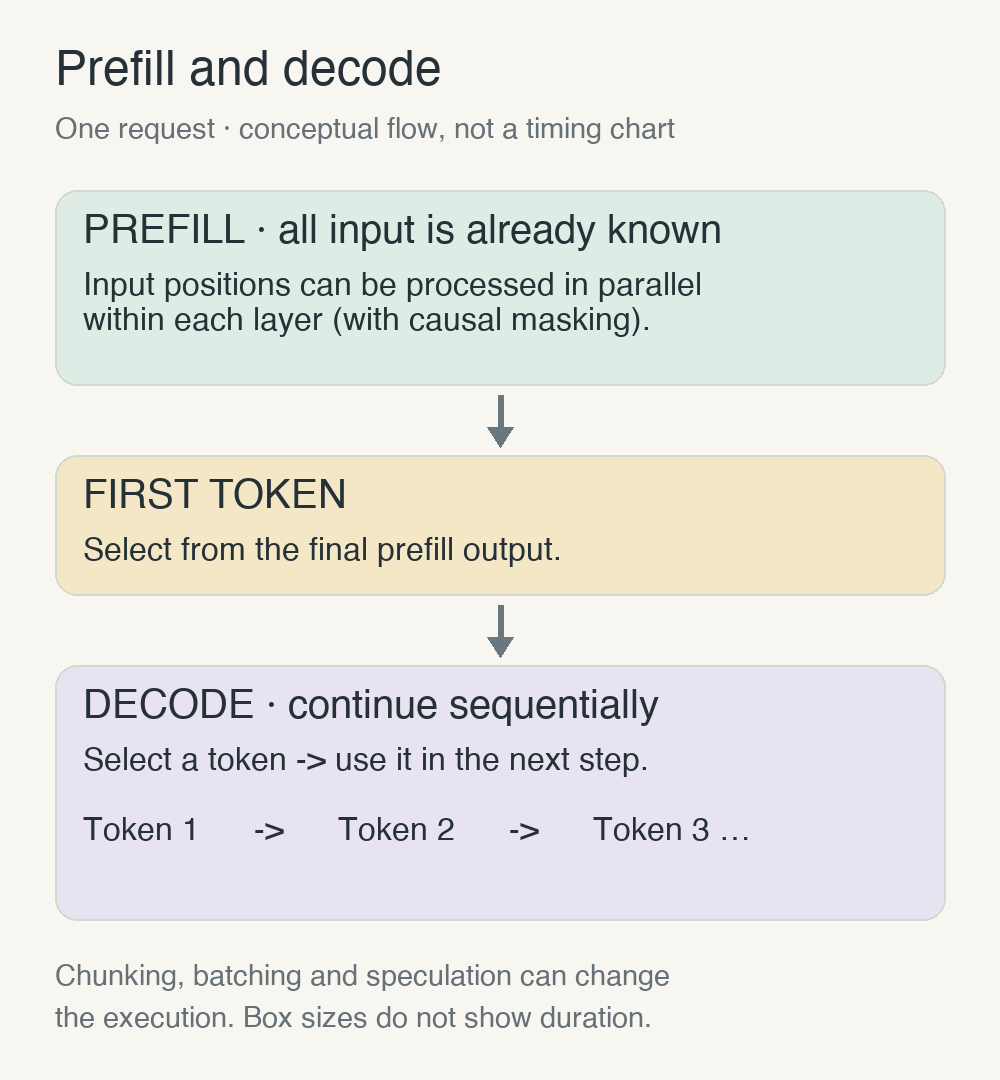
A server may process a prompt in chunks or interleave it with other requests. This diagram simplifies one request. I will cover ways to reduce sequential generation costs, including speculative decoding, in EP03.
A late start is different from slow streaming
Time to First Token (TTFT) measures the interval from sending a request to receiving the first output token. Here I exclude empty connection events or role-only messages. NVIDIA’s metrics documentation also excludes these empty responses.
That interval can include queueing, tokenization and transmission as well as prefill. If a request triggers model loading, loading can be part of the wait too. TTFT is not simply another name for prefill time.
| Question | Metric | Interval |
|---|---|---|
| When does the answer start? | TTFT | Request sent to first content token received |
| How quickly is the input processed? | Prefill throughput | Engine prompt tokens divided by engine prefill time |
| How quickly does the answer continue? | Decode throughput | Generation after the first token |
I will record the definitions alongside the benchmark:
TTFT = first_token_time - request_sent_time
prefill_tokens_per_second = processed_prompt_tokens / engine_prefill_seconds
decode_tokens_per_second = (generated_tokens - 1) / (last_token_time - first_token_time)
The last formula averages the interval after the first token. I will not calculate it for a one-token output, or when the first and last tokens arrive in the same chunk with no elapsed interval. A streaming chunk may contain several tokens, so counting chunks as tokens would also be wrong.
I will keep engine throughput separate from client delivery rate. With reasoning models, I will also distinguish the first generated reasoning token from the first token of the user-facing answer.
Under otherwise identical conditions without input-cache reuse, longer inputs give prefill more work. But a long wait for the first token does not necessarily mean slow generation afterward. A short prompt may start answering promptly while a large model still takes its time producing the rest.
Waiting for computation, or waiting for data
Two terms keep appearing in inference discussions: compute-bound and memory-bandwidth-bound. One describes a workload limited by computation; the other describes a workload limited by how quickly memory can supply the required data.
Prefill can reuse weights across multiple input positions. With enough input, that makes it easier to keep the compute units busy. Small-batch decode with a dense model is different: generating each token can require repeated weight reads with relatively little computation per byte read.
That helps explain why more GPU compute does not always produce a proportional increase in generation speed. It is not a universal rule that prefill is compute-bound and decode is memory-bound. Context length, concurrency, quantization, attention implementation and MoE architecture can change the balance. At long contexts, reading the KV cache can become significant too. The inference paper studies TPU hardware; I am not treating its performance numbers as predictions for my Mac.
Apple Silicon shares unified memory between CPU and GPU. MLX lets both use shared-memory arrays without copying their data between those devices. The GPU still has to read the weights.
Choosing 128GB is first a decision about how much data can stay in memory. Reading and processing that data quickly is a separate question. I have not established which resource limited the earlier iMac attempt either.
What changes between a Mac and an NVIDIA GPU?
I need to separate capacity from speed here too. For this comparison, I mean a conventional discrete NVIDIA GPU in a PC.
Prefill can group input positions in parallel, so compute capability, GPU utilization, bandwidth and kernel optimization all matter. NVIDIA has Tensor Cores and CUDA optimizations; on a Mac, performance depends on the model and its Metal or MLX implementation. Prefill is not always compute-bound.
Decode waits for earlier tokens. At small batch sizes, weight reads can become a bottleneck, making dedicated VRAM bandwidth on NVIDIA and shared-memory bandwidth on a Mac important. KV-cache size, context length, batch size and MoE architecture also change the balance.
If the model, KV cache and other working data fit in VRAM, a high-performance NVIDIA GPU can be fast at both stages. If they exceed it, CPU offloading or multiple GPUs may be needed, with costs for moving data over PCIe or other interconnects.
A high-memory Mac can keep some larger models in one memory space, while leaving room for the OS and development tools. More capacity does not guarantee better compute or bandwidth. If it still does not fit, swap or separate SSD-streaming implementations bring their own costs and support limits.
| Item | Apple Silicon | Discrete NVIDIA GPU |
|---|---|---|
| Memory | Unified Memory | VRAM + System RAM |
| Prefill limits | Compute, bandwidth, implementation | Compute, bandwidth, implementation |
| Small-batch decode | Shared-memory bandwidth matters | VRAM bandwidth matters |
| Large models | Unified-memory capacity | VRAM and offloading strategy |
| Execution tools | MLX, Metal, llama.cpp | CUDA, TensorRT-LLM, vLLM, etc. |
A KV cache keeps part of the earlier work
Recomputing the whole answer at every step would waste work. A conventional Transformer’s KV cache stores the keys and values used by attention for previous tokens, layer by layer. New keys and values are computed for the current token and added to that cache. Hugging Face’s cache documentation explains the process.
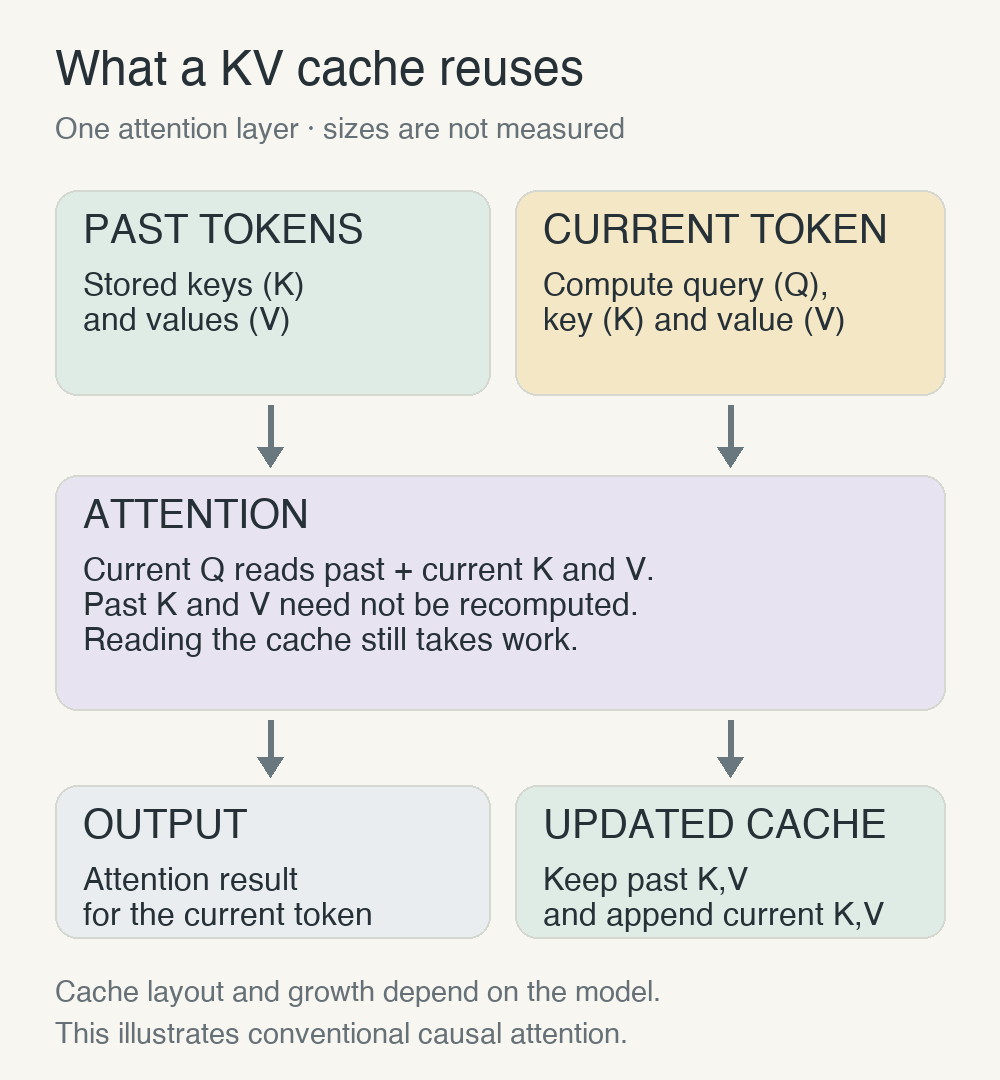
A cache does not make earlier context free. With conventional full attention, longer context means more cached information to consult. Sliding-window attention and other architectures can change how the cache grows.
There is also a difference between a KV cache within one response and a prefix cache reused across requests. MLX-LM supports prompt-cache reuse. If the same long question runs faster the second time, I first need to check whether the engine did less work by reusing the prompt.
What I plan to compare when the Mac arrives
Fix the conditions first
Comparing every model and runtime immediately would mix too many conditions. I will start with one model, one runtime and one request. Model files, tokenizer, chat template, quantization settings and runtime version will be fixed. The Qwen family I tried before is a candidate; I will recheck the exact supported checkpoint when I install it.
Inputs will be grouped by actual token count after applying the chat template: 512, 2,048 and 8,192 tokens are the planned lengths. I will cap output at 256 tokens and record actual output length and termination reason. Conditions exceeding the model’s supported context will be skipped.
For an NVIDIA comparison, I will aim to match model weights and quantization, actual input/output token counts and context length. I will record batch size (initially 1), warm-up, runtime/kernel versions and whether memory is offloaded.
Measure engine work and request latency separately
For engine-level work, I can use llama.cpp’s llama-bench. TTFT needs a separate local streaming request. This is an example baseline command, not a test I have run; the placeholder must be replaced with the selected model file:
./llama-bench -m MODEL.gguf -p 512 -n 256 -r 5 -o jsonIts basic prompt-processing and generation tests are separate. Running this command alone would not measure generation with a 512-token context, or client TTFT. To compare generation across context lengths, I will separately use requests that actually prefill those contexts.
The results are still blank
| Condition | What to record | Result |
|---|---|---|
| Process startup and model loading | Load time; whether loading is included in the request | Not measured |
| Resident model, no reused input cache | TTFT, prefill and decode across input lengths | Not measured |
| Reused cache for identical input | Cache use and number of reused tokens | Not measured |
I will exclude warm-up runs, then initially repeat each condition five times and report the median and range. A handful of runs will not establish precise tail latency. I will also record peak unified-memory use, system memory pressure and changes in swap. Where measurable, I will track GPU utilization and power, distinguishing GPU-only power from whole-system power. Because CPU and GPU share memory, I will not add overlapping memory counters and call the sum total usage.
When comparing runtimes, “4-bit” on both labels is not enough to establish identical conditions. Different model conversions, quantization formats or kernels make this more than an engine-only test. Without an NVIDIA measurement setup, I will not claim a direct benchmark comparison.
What I haven’t measured
Input processing and output generation are different workloads. To explain a wait, I need to measure them separately.
I do not yet know which stage will dominate on my Mac, how much memory headroom will change the experience, or what happens with development tools open alongside it. I have not inserted anyone else’s benchmark numbers as expected results. Both illustrations are explanatory diagrams.
Next is “Why Even a 128GB Mac Can Run Out of Memory.” I want to account for everything beyond the model file, then consider the trade-off between one large model and several models running together.
With the same budget, should I buy a Mac Studio or build an RTX GPU PC? Once large models, prefill/decode speed and image/video generation enter the picture, which makes more sense?
In EP05, I plan to compare specifications and complete workstation costs, rather than GPU prices alone.
References
Checked on October 8, 2026. The papers use hardware different from my ordered machine, and project features will be checked again at installation.
-
Attention Is All You Need — autoregressive decoders and causal attention.
-
Efficiently Scaling Transformer Inference — computation and memory traffic during prefill and decode.
-
NVIDIA NIM: Metrics — TTFT and post-first-token measurement intervals.
-
Hugging Face: Caching — KV-cache operation.
-
llama.cpp: llama-bench — prompt-processing and generation tests.
-
Apple: Metal Compute on MacBook Pro — unified memory and GPU working sets; figures for those older products are not specifications for my ordered Mac.
-
NVIDIA: GPU Performance Background and CUDA Best Practices — Tensor Cores, compute/bandwidth limits and host transfers.
-
llama.cpp, TensorRT-LLM and vLLM — execution tools and CPU/GPU split or offloading support.
This article records technical research done before my Mac Studio M5 Max with 128GB arrives. I will measure actual performance under controlled conditions and publish it in a separate experiment post.